



Have you used the Milestones / Goals field type?

  • June 2, 2026
  • 4 replies
  • 29 views

Naomi Katz
Forum|alt.badge.img

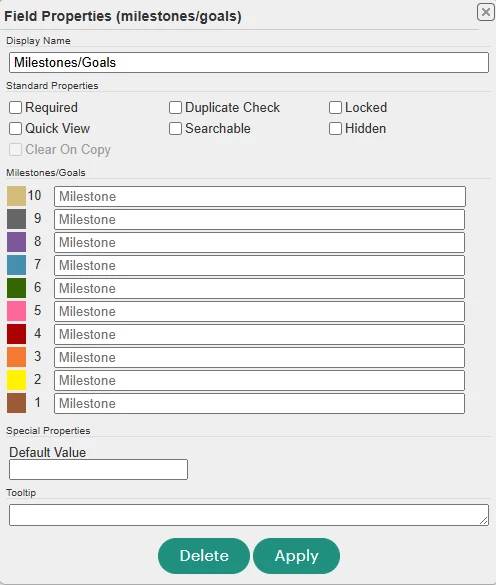
Has anyone used the Milestones/Goals field type in a form? If so, I’d love to hear how you used it. We haven’t used it yet and I’m having trouble picturing it on a live form. If you’re comfortable, please include a picture of how it’s being used at your agency as well.


4 replies

Eileen Burk
  • First Timer
  • June 3, 2026

Here is a corollary question: I need to track progress against goals. Does anyone have any suggestions?


Naomi Katz
Forum|alt.badge.img
  • Author
  • First Timer
  • June 5, 2026

Here is a corollary question: I need to track progress against goals. Does anyone have any suggestions?

Hi Eileen! We are actually doing this with 2 programs right now. Here’s the set-up:

We have a tier 2 “Goal Overview” form with basic information about the goal including the current status, topic, target completion date, and actual completion date.

This form is linked to a “Goal Action Steps” tier 2 form where staff document the individual steps taken to progress towards the goal. The action steps form is very similar to the goal overview form. The biggest difference is the Goal Overview form includes a section with text boxes to help with SMART goal planning. The Action Steps form does not include that extra info.

Here’s the Action Steps form.


The combination of the two allows you to see progress on goals that take longer to accomplish like finding stable housing.

The two forms are linked using a wizard link with the Goal Action Steps set as the base form and the Goal Overview set as the target form. This is because you may have a goal set with no action steps taken yet but you won’t have action steps before you set your goal.

Hope this helps!


Eileen Burk
  • First Timer
  • June 5, 2026

Thank you so much. This is very helpful.


Naomi Katz
Forum|alt.badge.img
  • Author
  • First Timer
  • June 5, 2026

Thank you so much. This is very helpful.

No problem Eileen!