

How do I manage membership renewals in 'Donor Management'?
You can use this article as a checklist of "things to do" when managing membership renewals in your 'Donor Management' system.
Step 1: Navigate to your 'Contacts' page
Each month, you can create a list with all members due to renew the following month.
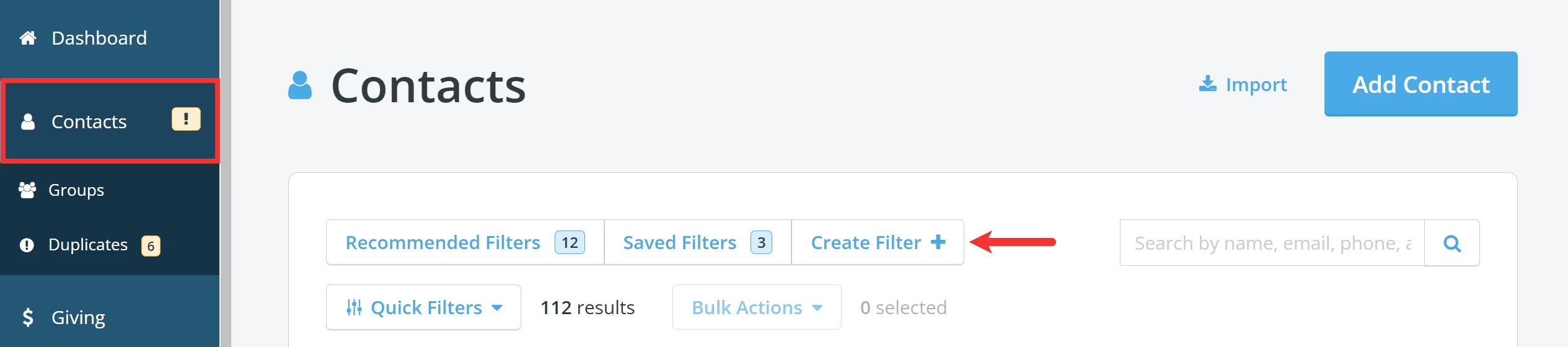
From your 'Donor Management' Dashboard, click the 'Contacts' tab on the left navigation panel. This will bring you to your main 'Contacts' page where you can click the 'Create Filter +' button to get started!
Step 2: Build your filter
You can build your filter based on the custom fields you created to segment your contacts based on end dates and membership levels.
Step 3: Create and assign tasks
You can also create a new task each time you update the membership data on the contact record – here’s how! By creating a task, you can:
-
send individual reminders to reach out
-
provide your future self-notes to make following up easier
-
assign renewal tasks to other team members
Step 4: Create a template for renewals communications
Save time and create a template for those targeted communications. Check out the articles below for additional guidance!
- How do I build an 'Email Blasts' template?
- How do I create a Direct Mail template?
- How do I create merge tags?
Note: You can use custom fields as merge fields in these communications - so, be sure to include all relevant renewal details.
What else do you need help with?
Not quite what you were searching for?
Navigate back to the Donor Management Index.
How do I track membership renewals in Donor Management? | How do I create a filter for members due to renew? | How do I send renewal reminders to members? | Can I use custom fields to manage membership end dates? | How do I create tasks for membership follow-up? | How do I build a membership renewal email template? | How do I segment members by renewal date?