


Apricot Data Standards & Service Provider Networks Overview
Apricot Data Standards and Service Provider Networks help organizations collect, structure, and share data more consistently. Together, they support clearer reporting, stronger collaboration, and more confidence in the results you use to demonstrate impact.
At the core of this framework are Data Standards. Data Standards define how data is collected and structured in Apricot and can be used by a single organization on their own. They are also required for reporting in tools like Impact Hub.
Service Provider Networks build on Data Standards by allowing organizations to collaborate and align data collection across multiple Apricot organizations. Networks are optional and are used when organizations want to share Data Standards and support coordinated reporting.
Data Standards Field Visibility & Form Designer Behavior
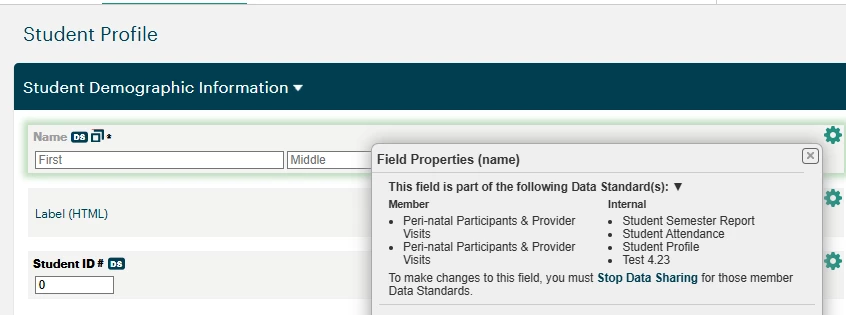
Fields associated with a Data Standard are marked with a DS icon directly in the Form Designer, giving all admins clear, shared visibility into which fields on which forms are part of active Data Standards — whether used for internal reporting or shared across a Service Provider Network.
Network-Shared Data Standard Fields
Fields that are part of a Data Standard shared by a Network Lead appear locked in the Form Designer. This is by design — as a member of a Service Provider Network, your organization has entered into a data sharing agreement that requires these fields to remain consistent and compliant with the Network Data Standard. Editing or removing these fields would represent a departure from that agreement.
If updating or removing a locked field is the desired course of action, admins are prompted directly in the Form Designer modal to navigate to the Stop Share process. Stopping the share would remove the data sharing agreement for that Data Standard, after which the fields can be modified freely.
Self-Implemented & Internal Data Standard Fields
Fields tied to non-networked or self-implemented (internal) Data Standards remain fully editable, removable, and adjustable in the Form Designer. These fields are not subject to a network agreement, so changes can be made at any time.
To reflect field-level changes in the Data Standard itself — such as adding or updating fields — simply create a new version of the relevant Data Standard. This captures the updates and keeps your internal standard current without disrupting existing data.
The sections below organize all help content related to Data Standards and Service Provider Networks so you can quickly find what you need based on your goals.
Data Standards & Service Provider Networks Basics
Data Standard Implementation
Service Provider Network Management
Want a guided walkthrough?
Watch the on-demand recording or register for a live Getting Started with Impact Hub webinar to see how Data Standards and Networks connect to Impact Hub — and what you need to do in Apricot to get reporting up and running.
At the live session, you can bring your specific questions and get real-time answers from our team.
What are Data Standards and Service Provider Networks in Apricot? | How do Data Standards help reporting in Apricot? | What is a Service Provider Network in Apricot? | How do I share a Data Standard with other organizations? | Why should I use a Service Provider Network in Apricot? | How do Data Standards support collaboration across organizations? | How do I start using Data Standards for Impact Hub reporting?