


Sally Heaven
Product Pro
August 6, 2026
Solved

Where did the spam complaint metric go?

  • August 6, 2026
  • 6 replies
  • 32 views

Hi! This help file mentions the metric “Spam Per Recipient.”

However, I cannot find a field or column for spam complaint rate, or for the number of spam complaints, anywhere in Targeted Email or in the Email Performance Report.

I recall there used to be a metric on the Targeted Email Dashboard showing the complaint rate for the last 30 days along with the other metrics there like open, click, bounce, and unsubscribe rates, plus the amount raised. 

But it’s not there anymore. Where did it go?
Best answer by veronica

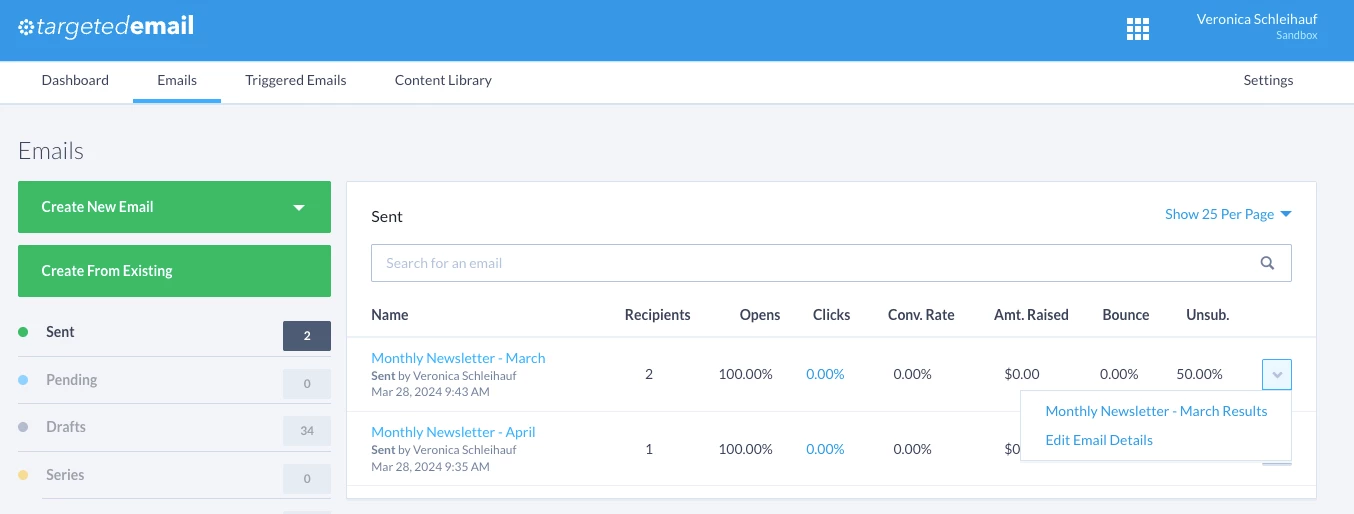
The best way I have found to see spam complaints is through the Email Address Status Report. This does not report an email that resulted in the Spam complaint, but it does include a date that they unsubscribed via that method, which could potentially be used to match against the send date of emails. Could that be what you’re thinking of?

Alternatively, if you go to Targeted Email > select an individual email’s performance results using the drop down arrow on the right, you’ll see detailed results including spam complaint rate at the very bottom for per-email performance. 

6 replies

veronicaAnswer
First Timer
August 7, 2026

The best way I have found to see spam complaints is through the Email Address Status Report. This does not report an email that resulted in the Spam complaint, but it does include a date that they unsubscribed via that method, which could potentially be used to match against the send date of emails. Could that be what you’re thinking of?

Alternatively, if you go to Targeted Email > select an individual email’s performance results using the drop down arrow on the right, you’ll see detailed results including spam complaint rate at the very bottom for per-email performance. 

rachel moody
Community Manager
August 10, 2026

I see the same thing as ​@veronica : You have to go to that specific email results to see Spam Complaint. 

Rachel at Bonterra
Sally Heaven
Product Pro
August 10, 2026

Right, thank you both so much, ​@veronica and ​@rachel moody! I could have sworn that at some point the 30-day average spam complaint rate percentage was exposed in the top bar of the Targeted Email Dashboard. Was it? It’s very possible that I am misremembering. Thank you for pointing me in the right direction. 

Raise HECK, a Bonterra partner and certified Super User
First Timer
August 13, 2026

@Sally Heaven  You’ve had me second guessing since asking! But as of yet I haven’t found any evidence it of previously being available… But I'm still wondering... I had a similar Mandela effect moment recently with Create a List, where I (and two other people) could have sworn a filter existed that we couldn’t find😅

Sally Heaven
Product Pro
August 13, 2026

Which filter was it? I’m always eager to join a shared delusion. (My biggest Mandela effect moment was the Berenstain Bears!)

Raise HECK, a Bonterra partner and certified Super User
First Timer
August 13, 2026

Convinced ourselves that “Follow Ups” had their own section entirely in CAL / at least had all the Follow Ups fields available to filer on. Apparently nope! It’s always only the Follow Up fields available under Contact History.
