Solved

Contact Engagement Segmentation using NFG Filters

  • April 17, 2026
  • 1 reply
  • 19 views

Kate Gray

Does anyone have advice on creating filters in NFG for segmenting contacts by level of engagement? For example, high engagement contacts having donated and opened emails recently, middle engagement within the last couple years, and low engagement not donating or opening emails in the last several years. We tried setting up the filters this way and NFG does not seem to be pulling records accurately; wondering if there is something we are missing.
Best answer by Charles Case

Hi ​@Kate Gray ! I’d recommend these filter conditions in the Contacts tab:

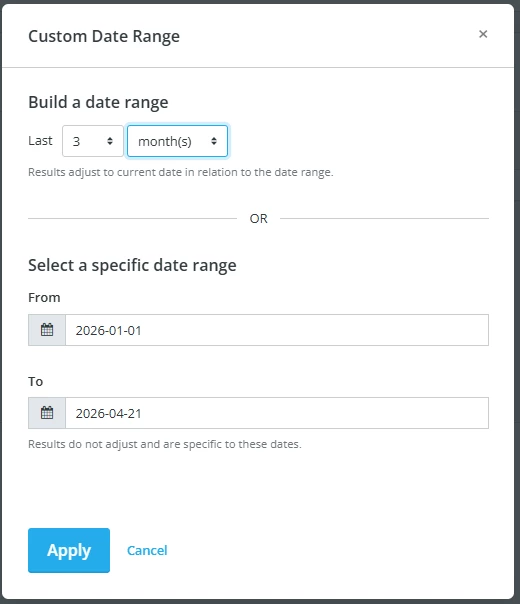
  1. “Opened email blast (custom date range)” - in the options for timeframe, I recommend building a date range (like last 30 days) rather than setting the specific calendar dates. This makes it more effective for future use if you save the filter.
     
    You can also set “is true” for have opened or “is false” for have not opened.
     
  2. I would do the exact same thing with “Number of donations (custom date range)”-- this lets you have consistent timeframes across both conditions. You’ll then set “greater than or equal to” and do “1”.
     

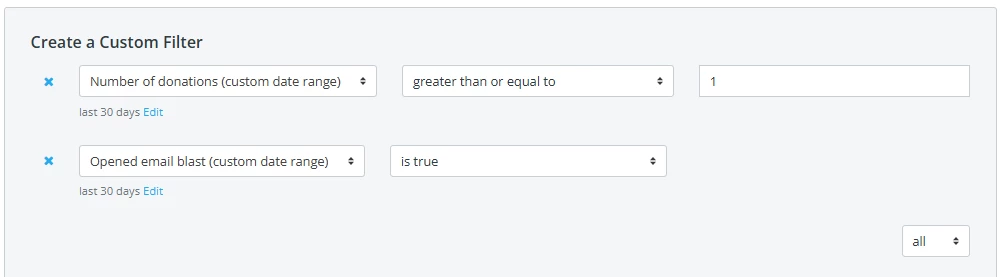
With both of these conditions, be sure your ‘rule’ is set to “All”. Here’s an example for recent donations/engagement:

Hope this helps! If you’re doing this and believe you’re getting incorrect information, I’d recommend reaching out to our support team at success@networkforgood.com.

1 reply

Charles Case
Forum|alt.badge.img
  • Community Manager
  • Answer
  • April 21, 2026

Hi ​@Kate Gray ! I’d recommend these filter conditions in the Contacts tab:

  1. “Opened email blast (custom date range)” - in the options for timeframe, I recommend building a date range (like last 30 days) rather than setting the specific calendar dates. This makes it more effective for future use if you save the filter.
     
    You can also set “is true” for have opened or “is false” for have not opened.
     
  2. I would do the exact same thing with “Number of donations (custom date range)”-- this lets you have consistent timeframes across both conditions. You’ll then set “greater than or equal to” and do “1”.
     

With both of these conditions, be sure your ‘rule’ is set to “All”. Here’s an example for recent donations/engagement:

Hope this helps! If you’re doing this and believe you’re getting incorrect information, I’d recommend reaching out to our support team at success@networkforgood.com.