


Question

Within Events need ability to Adjust the Qty. to purchase.

  • May 6, 2026
  • 8 replies
  • 43 views

Tom Happ
Forum|alt.badge.img

Within the Events Sponsors we need the ability to adjust/enter the qty. they would like to order for sponsorship.

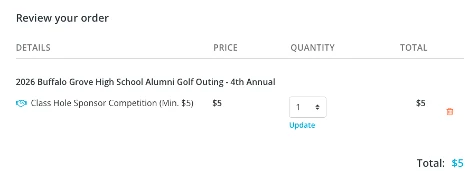
We are selling $5 Sponsorship Donations for our “Class Hole Sponsorship Competition” and the min. is $5 but we want our sponsors to click on it and be able to enter a qty. they wish to purchase (ie. Qty 10 = $50 Sponsorship).  Currently it allows you to “Edit” but not actually enter the qty. you want to order.


8 replies

Karen Fishburn
Forum|alt.badge.img

Within the Events Sponsors we need the ability to adjust/enter the qty. they would like to order for sponsorship.

We are selling $5 Sponsorship Donations for our “Class Hole Sponsorship Competition” and the min. is $5 but we want our sponsors to click on it and be able to enter a qty. they wish to purchase (ie. Qty 10 = $50 Sponsorship).  Currently it allows you to “Edit” but not actually enter the qty. you want to order.


Hi. Did you ever get an answer about this? The only way to do this would be to create a Hole Sponsor for each hole and then leave the quantity available empty for each hole sponsorship (unlimited). As far as I can tell there is no way to allow the purchase of multiples of the same sponsorship. Alternately, you could create Class Hole Sponsor levels at just $5, another at $10, another at $15, etc. and that way participants could select a multiple - unfortunately, just not in the way that makes the most sense...good luck!


Charles Case
Forum|alt.badge.img
  • Community Manager
  • May 14, 2026

Hi ​@Tom Happ & ​@Karen Fishburn - I know Tom and I talked about this in Office Hours, but just to check in… I’m awaiting feedback from the Product Team on if this is the expected action or an error! I’ll report back as soon as I hear.


Karen Fishburn
Forum|alt.badge.img

Hi ​@Tom Happ & ​@Karen Fishburn - I know Tom and I talked about this in Office Hours, but just to check in… I’m awaiting feedback from the Product Team on if this is the expected action or an error! I’ll report back as soon as I hear.

Charles, here is what they support responded with “That’s correct, Karen. In our Events sponsorship flow, a sponsor can only select one sponsorship level per checkout, even if the sponsorship quantity is set to unlimited. 
So if you need one sponsor to buy 2 hole sponsorships, the only way to do that online is to create separate sponsorship levels for each hole (for example, “Hole 1 Sponsor” and “Hole 2 Sponsor”), then the sponsor can select each one during checkout.
Sponsorships are designed to be purchased as individual sponsorship levels, not as a multi-quantity item. “ I’d be interested in know (as well) if there is another easier work around for something like this.

Thanks.


Charles Case
Forum|alt.badge.img
  • Community Manager
  • May 14, 2026

A solution that I think would work (at least better than the current one):

  1. Create these sponsorships as tickets
  2. Make sure the ticket does not represent a Guest
  3. Create your sponsorships as FREE, and make their available date in the past.
  4. This allows you to go in and add sponsors to show up on the event page but keeps the separate sponsorship area hidden

Karen Fishburn
Forum|alt.badge.img

A solution that I think would work (at least better than the current one):

  1. Create these sponsorships as tickets
  2. Make sure the ticket does not represent a Guest
  3. Create your sponsorships as FREE, and make their available date in the past.
  4. This allows you to go in and add sponsors to show up on the event page but keeps the separate sponsorship area hidden

Hi Charles - I don’t really understand how the above helps with the original request by Tom. Why would you want to hide the sponsorship area? Anyway, if it helps Tom then I guess this is the answer. Thanks, and enjoy your weekend.


Charles Case
Forum|alt.badge.img
  • Community Manager
  • May 15, 2026

@Karen Fishburn 

If you need to sell multiple quantities of a Sponsorship, there is no good way of doing so. So if they are tickets instead, that solves the customer purchasing experience. But! You still want to be able to promote those sponsors on your Event page. If those sponsorships are listed as tickets already, we wouldn’t want them to also be listed in Sponsorships--confusing! So creating a free sponsorship and setting the availability to the past allows you to hide the sponsorship from being purchased on the event page, but lets you add those sponsors on the backend that bought the ticket sponsorship so they can get the originally intended promotion. Does that make sense?


Karen Fishburn
Forum|alt.badge.img

@Karen Fishburn 

If you need to sell multiple quantities of a Sponsorship, there is no good way of doing so. So if they are tickets instead, that solves the customer purchasing experience. But! You still want to be able to promote those sponsors on your Event page. If those sponsorships are listed as tickets already, we wouldn’t want them to also be listed in Sponsorships--confusing! So creating a free sponsorship and setting the availability to the past allows you to hide the sponsorship from being purchased on the event page, but lets you add those sponsors on the backend that bought the ticket sponsorship so they can get the originally intended promotion. Does that make sense?

Yes, it makes sense, but it means that the purchaser will need to complete guest info (at a minimum just their name) for each # of “tickets” they purchase. And then we have to remember to return to the event page to enter the sponsorship information manually. I guess there is a work around to every situation. Thanks Charles.


Peter Hart
Forum|alt.badge.img
  • Bonterran
  • May 19, 2026

Thank you for this feedback. We’re in the process of making the quantity editable in the checkout / cart so that an individual can select up to the number of sponsorships available. We will update here once this is live!