


Jill Tigner
First Timer
May 26, 2026
Solved

ADD DONATION - Campaign

  • May 26, 2026
  • 2 replies
  • 28 views

When adding a donation, there is a section “OPTIONAL DETAILS” “CAMPAIGN - Select an existing campaign”.  Most of the campaigns listed under this drop down are no longer active and are not tied to our active campaigns, (we currently only have two).  Is there a way to archive these campaigns so they no longer show on the drop down?  TIA for your help!
Best answer by rachel moody

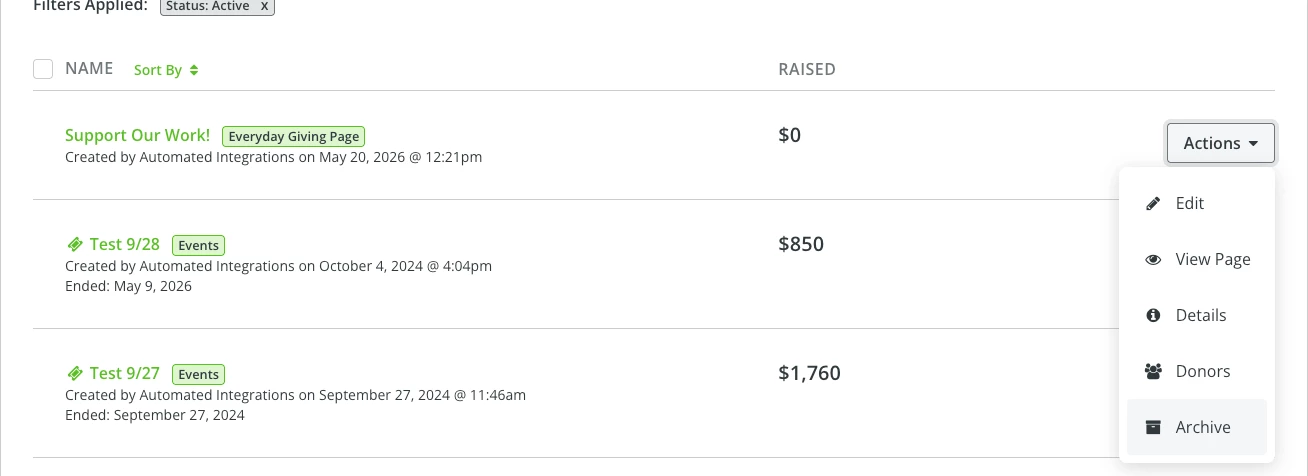
Hi ​@Jill Tigner ! You can archive campaigns under the giving tab. Select campaigns under the giving tab and then you can just go to the actions dropdown next to the campaign and select “archive.” That should take it away from the dropdown when you add an offline gift. 


2 replies

rachel moody
Community Manager
May 27, 2026

Hi ​@Jill Tigner ! You can archive campaigns under the giving tab. Select campaigns under the giving tab and then you can just go to the actions dropdown next to the campaign and select “archive.” That should take it away from the dropdown when you add an offline gift. 


Rachel at Bonterra
Jill Tigner
First Timer
June 1, 2026

Thank you!