


Apricot: AI-powered participant summaries, smarter user search, and import improvements

Release Notes | Week of May 18 | Apricot 8.54.1
Overview
Apricot 8.54.1 introduces Participant Snapshot, a new Que-powered AI feature that surfaces recent participant activity at a glance. This release also improves how you search for users and assign record ownership during imports.
Enhancements
Apricot Que | Participant Snapshot
Participant Snapshot is a new AI-powered feature that gives you an instant summary of recent participant activity directly in the Document Folder — no more manually searching through records before an interaction.
To try it, select "Generate with Que" in the Document Folder.

Que respects your existing permissions, keeps personally identifiable information (PII) protected, and never uses your data for AI training.
Participant Snapshot is free and enabled by default for all users during the beta period. Organization admins can disable Que features at any time in the A La Carte Features menu.
Users | Hide inactive users in user search
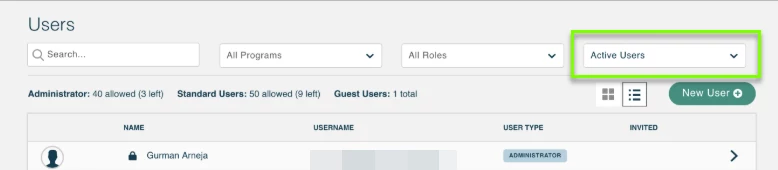
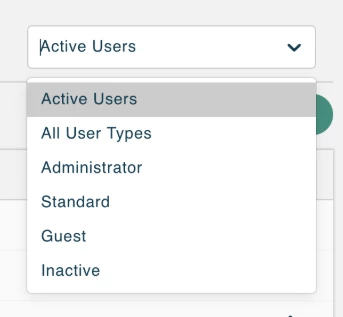
User Search now defaults to showing only active users, making it easier to find who you're looking for. Admins can also filter by user type using a new filter option. If you need to locate and reactivate an inactive user, select the option to show inactive users from the filter menu.
Importing | Assign record ownership row by row
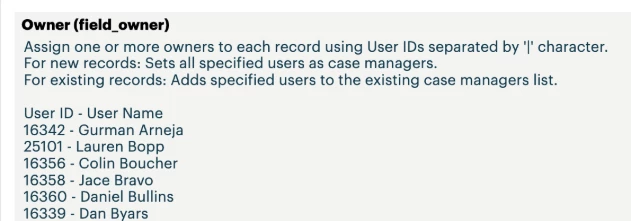
When importing records, admins can now assign a record owner for each row directly in the import file. This eliminates the need to run follow-up imports or manually update record ownership after the fact.
- Add one or more owners to a row using their User IDs, separated by a pipe character ( | ).
- For new records, all specified users are set as case managers.
- For existing records, the specified users are added to the existing case managers list.
Fixes
Links | Deleting links with JAWS screen reader
Users who rely on the JAWS screen reader can now successfully delete links. Previously, this action was inaccessible when using JAWS.
Links | Searching for records to link with JAWS screen reader
Users who rely on the JAWS screen reader can now search for records to link without issue. Previously, the record search was inaccessible when using JAWS.