

Liz Ragland
Mar 4, 2026 2:52 PM UTC

How do I collect information for event attendees?

Need to collect contact information and personal preferences for your upcoming gala? Looking for information on each person in the four-person parties for your golf tournament?


Our Events pages provide an easy way for you to collect and organize this information - below, we've prepared a helpful guide on how to create and use the "questions" feature to collect whatever information you might need to make your event a success.


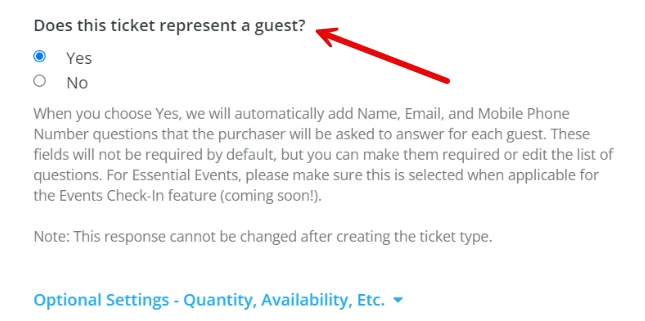
Step 1: Select "Yes" for the question "Does this ticket represent a guest?" when creating your ticket types

When adding a new ticket to your event, you'll see an option to collect contact information for each guest.
 

2456729-How_do_I_collect_information_for_event_attendees-Does+this+ticket+re.png

By selecting "Yes," you'll automatically be able to collect the name, email, and mobile phone number for each guest that selects that ticket type. The questions won't be required for your ticket purchasers to answer, but it does allow them to enter that information for their party of guests if they have that information handy.


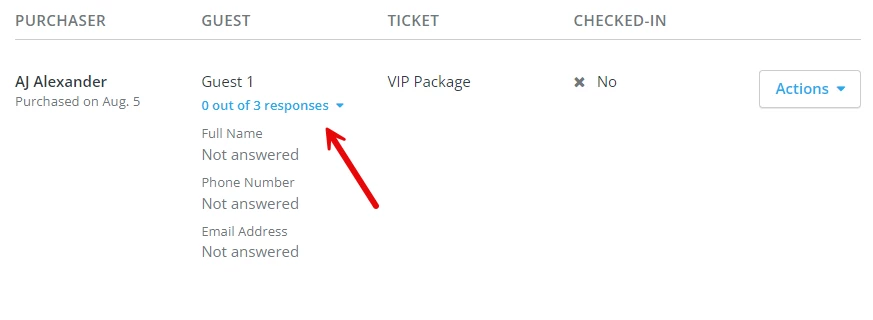
You can then also edit the questions once your page has been published, or make them required (if you wish).
 

2456729-How_do_I_collect_information_for_event_attendees-Ticket+Represents+G.png


This also will automatically fill in the first guests' name, phone number and email address as the individual purchasing the ticket - but not to worry, this can also be edited once the ticket has been created.


Step 2: Add additional questions for your guests to answer

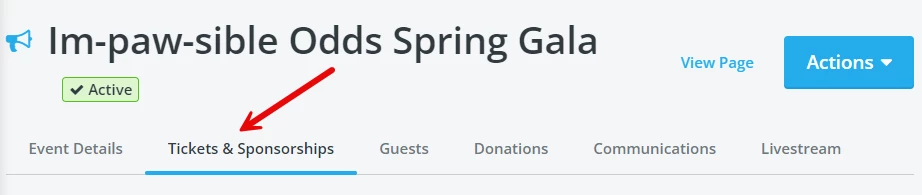
You also have the option to add additional questions under the "Tickets & Sponsorships" tab, if you wish.
 

2456729-How_do_I_collect_information_for_event_attendees-Tickets+-+Sponsorsh.png


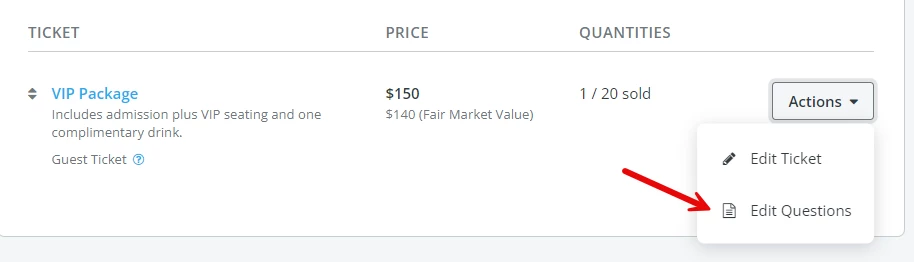
You'll want to click on the "Actions" button next to the ticket type you're looking to modify, and select the option to "Edit Questions."
 

2456729-How_do_I_collect_information_for_event_attendees-Tickets+and+Sponsor.png


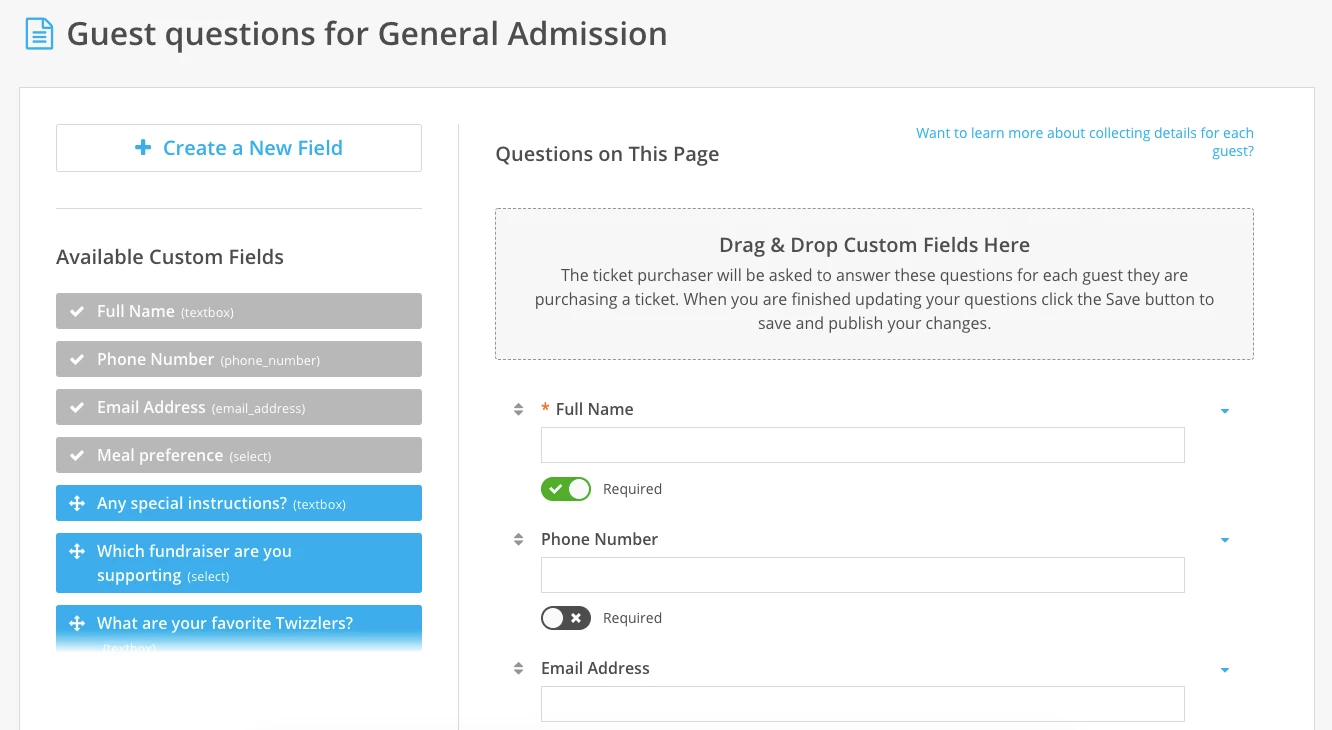
By clicking "Edit Questions," you'll be taken to the "question builder" module, where you can add questions to your ticket, rearrange the order in which they are asked, or modify existing questions to best reflect your upcoming event.
 

2456729-How_do_I_collect_information_for_event_attendees-Screen+Shot+2019-01.png


You can also make these questions required if you choose - which means the ticket purchaser cannot complete the checkout process without providing these details for each guest.
 

Please be aware that any additional questions you add are ticket-specific, meaning you will need to apply them to each ticket type individually to ensure they'll show up on multiple ticket types. However, you are able to add questions that you created for one page to other pages, so you won't have to re-create the questions you ask for every similar event.


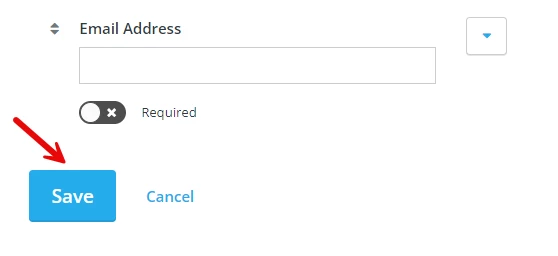
Step 3: Click "Save" to publish your changes
 

2456729-How_do_I_collect_information_for_event_attendees-Ticket+Questions+Sa.png


Once you've edited the questions to your satisfaction, click "Save" at the bottom of the page to add or update those questions on your ticket.


What else do you want to do?


Not what you're looking for?

Go back to the Feature Overview.

How do I collect guest information on my event page? | How do I add custom questions to event tickets? | How do I require attendees to enter meal choice or preferences? | How do I collect contact information for each event guest? | Why aren’t guest questions showing on my ticket type? | Can I make event registration questions required? | How do I edit questions for a specific ticket type?

How do I manage existing facebook ad audiences? | How does manage existing facebook ad audiences work in EveryAction? | Why can't I manage existing facebook ad audiences? | Where do I manage existing facebook ad audiences in EveryAction? | What is manage existing facebook ad audiences in EveryAction? | How to manage existing facebook ad audiences? | Can I manage existing facebook ad audiences in EveryAction?

10 replies

Christy Bond
Explorer
May 14, 2026 6:28 PM UTC

I have set up my tickets and seem to be collecting the info in my golf tournament registration.  However,  I cannot find where I see the info they entered - i.e. the names of those on each team.  I added questions for them to enter each team member - I just can’t find it!  Any help appreciated!!

rachel moody
Community Manager
May 15, 2026 3:14 PM UTC

Hi ​@Christy Bond ! You should be able to see all of your guest details under the Guest tab when you manage your event. You should see all of the questions you added under each guests name where you see in my example “0 out of 3 responses.”


Rachel at Bonterra
stownsend
Explorer
Jul 29, 2026 2:41 AM UTC

One of the payment options when entering an offline ticket or sponsorship purchase is “invoice.” However, if selecting that I don't see a way to generate an invoice in the system. Is there a way to invoice those that we are entering their ticket purchase manually? 

Charles Case
Community Manager
Jul 29, 2026 8:22 PM UTC

Hi ​@stownsend ! There is no specific invoice functionality built into NFG. To do this inside the software, I’d recommend creating an email blast template as your invoice that you can send out.

The other option would be to think of it as a pledge. However, pledges are only tied to donations, not ticket/sponsorship purchases, so it might create more work than it’s worth.

Charles Case (they/he)
Karen Fishburn
Rising Star I
Rising Star I
Sep 18, 2026 6:16 PM UTC

Hi. Is there a way to delete ticket questions that are no longer valid? Also, if I can’t delete because they are “attached” to a specific event, is there a way to move questions that are no longer valid to the bottom of the list -  so that only the valid questions that we are using on a regular basis are at the top of the list? Every time I try to move the question label it just returns to the same spot on the left hand side list. This means that I have to scroll through every question that we’ve ever created to find the ones that we now use. I have added (DO NOT USE THIS QUESTION) to the questions that are no longer valid, but would be helpful if all of those could be grouped at the bottom of the (long) list of options. Thanks!


Karen Fishburn

Karen Fishburn
Charles Case
Community Manager
Sep 18, 2026 6:45 PM UTC

Hi ​@Karen Fishburn --Unfortunately, I can see no way to remove or reorder old ticket questions. They don’t populate into the Custom Fields area of DMS like a Custom Question on an Everyday Giving Campaign does.

Charles Case (they/he)
Karen Fishburn
Rising Star I
Rising Star I
Sep 18, 2026 7:17 PM UTC

Charles, thank you for your response. That’s too bad. Well at least I can add the words DO NOT USE to outdated questions. If this something that might be an option in the future?

Also, is there a way to get ticket questions to transfer when we clone a campaign? Right now the ticket questions don’t come over - super frustrating when we have a monthly series and we clone the event page, but I have to add the ticket questions each time (even though they are the same for each monthly session). Thanks!

Karen Fishburn