

How do I set up tickets to represent individual guests?
In most cases, you'll want to set up your tickets within an Events page to represent individual guests - meaning that each ticket purchase represents a singular individual who will be attending your event.
In order to ensure that your tickets are set up this way, please follow the step-by-step guide below.
Step 1: Create a new ticket type for your upcoming event.
Not sure how to create a new ticket type? Check out our related guide here.
Step 2: Locate the field labeled "Does this ticket represent a guest?"
In order to indicate that each ticket represents a different individual, you will need to select "Yes" for this question.
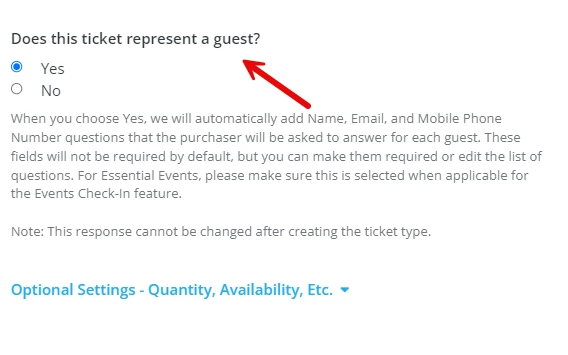
Doing so will also automatically add the ticket purchaser's name, email, and mobile phone number to that ticket, so you can easily collect that information for each guest. The questions won't be required for your ticket purchasers to answer, but it does allow them to enter that information for their party of guests if they have that information handy.
Is the ticket purchaser buying multiple tickets for different individuals, but doesn't have their information available during purchase? You can edit the information for each guest after the fact by following these steps.
What else do you want to do?
Not what you're looking for?
Go back to the Feature Overview.
How do I create event tickets for individual guests in Network for Good? | How do I make each ticket represent one attendee? | How do I collect contact info for each ticket holder? | What does “Does this ticket represent a guest?” mean? | How do I set up single guest tickets? | How do I track each attendee separately on my event page? | Can I edit guest information after tickets are purchased?
How do I use different facebook audience types? | How does use different facebook audience types work in EveryAction? | Why can't I use different facebook audience types? | Where do I use different facebook audience types in EveryAction? | What is use different facebook audience types in EveryAction? | How to use different facebook audience types? | Can I use different facebook audience types in EveryAction?