


How do I create a user account?
We’ve made some updates to our login experience! If you come across references to “ActionID” in our help resources, those are being updated to reflect the new name: Bonterra Account. Nothing changes on your end as we tidy up the documentation.
You can create and edit other users provided that all of the following are true:
- your User Profile contains the 'Create and Edit Users' security function
- you have access to the same or more Committees than the user you want to edit
- if in a state-based database, you have access to the same or more states than the user you want to edit
- you have a higher-level User Profile than the user you want to edit
Step 1: Navigate to Users
- From the homepage, navigate to the left-hand menu. Click Administration > Users, Profiles, and Committees > Users.
- Or use the Search for a page field and type Users.
Step 2: Enter details for the new user
Select 'Add New User' and enter their Contact Information and Committee.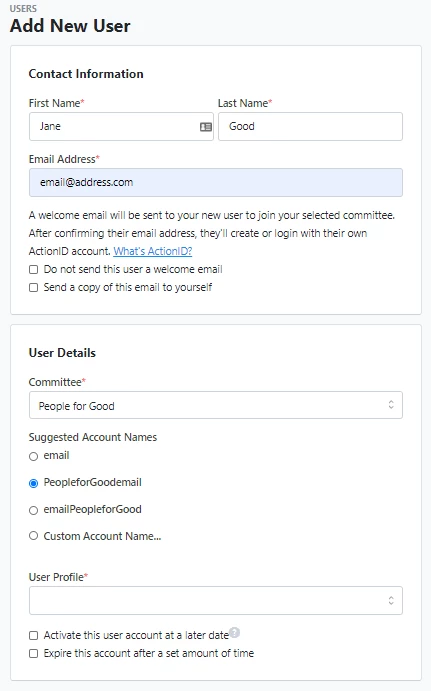
Step 3: Choose an account name
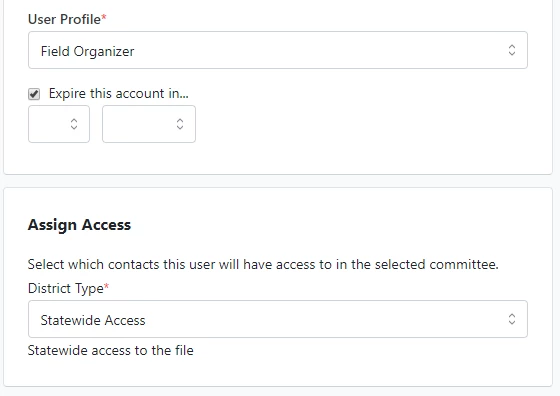
Choose an Account Name and then select a User Profile or User Role. If necessary, set an expiration date. The 'Assign Access' option will also appear for state-based databases.
New users will automatically receive a welcome e-mail unless you select 'Do not send this user a welcome email'. The invitation will contain the Committee name, site name, and login URL.
The invite expires after 48 hours.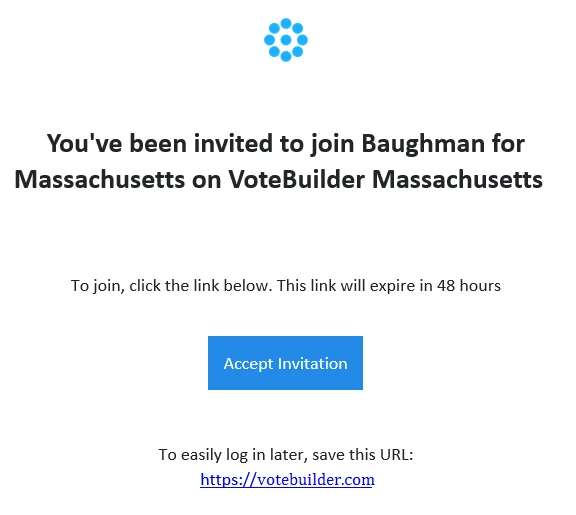
Volunteer Accounts
While we understand your organization may have volunteers who assist you, we urge you NOT to create generic shared volunteer accounts reused by multiple folks.
Individual accounts ensure the following:
- Transparency: If someone makes a mistake when entering data, editing a contact record, or doing anything else in the database, it is easier to identify which person performed that task if your users are not sharing accounts. It will also make it easier to resolve the issue, such as wiping inaccurate data from contact records.
- Ease: It is now easier to avoid creating a user for each volunteer if necessary. Volunteers doing phone banking and canvassing can create their own Bonterra Account, canvass with MiniVAN, and make calls via 'Open Virtual Phone Bank'.
- Security: Should any volunteer appear to be doing anything dubious or submitting fake data, it is easier to identify that person and shut down or limit their access if each person has their own user account.
How do I create a user account? | How does create a user account work in EveryAction? | Why can't I create a user account? | Where do I create a user account in EveryAction? | What is create a user account in EveryAction? | How to create a user account? | Can I create a user account in EveryAction?