

How do I properly align my mailing labels?
When creating mailing labels, names and addresses should line up properly on the page. If your mailing labels are not printing out correctly; they might be off-center or even printing off the label entirely.
Check out the article below for tips on how to resolve this issue!
Adjust Your Printer Settings
Mailing labels may not line up correctly if your printer automatically adjusts how your information is displayed on the page. So, we recommend checking your printer's settings as they may be why your mailing labels are not printing out as expected.
When printing mailing labels, a pop-up window should appear confirming the printer’s settings for the print job. Typically, there are 'Scale' or 'Fit to Page' options, which allow the printer to adjust the printed dimensions of the file.
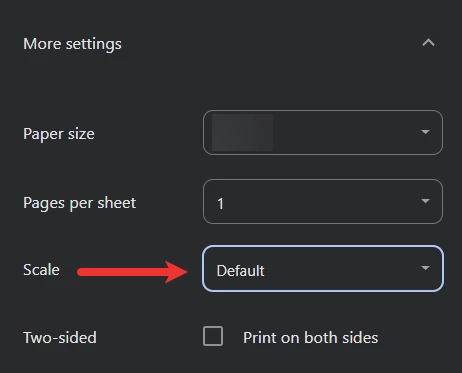
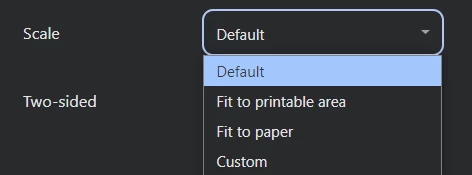
These options adjust how labels are printed and the placement of the words on the page - so, be sure to confirm they are not selected (they should be unchecked or set to 'Default').
Tip: Double-check your settings each time you print out mailing labels from 'Donor Management', since some browsers or PDF readers may save default settings for future use.
What else do you need help with?
How do I create a letterhead for use with 'Direct Mail'?
How do I send a bulk 'Direct Mail' communication?
How do I send 'Direct Mail' to a specific individual?
Not quite what you were searching for?
Navigate back to the Feature Overview.
Why are my mailing labels printing off center? | How do I fix label alignment when printing from Network for Good? | Why are my address labels not lining up correctly? | What printer settings should I use for mailing labels? | Should I turn off Fit to Page when printing labels? | How do I adjust scale settings for label printing? | Why are my labels printing outside the label borders?