


How do I interpret my Grant Evaluation?
When you generate a grant evaluation in the Bonterra Nonprofit Hub, you receive results across three dimensions—eligibility, effort to apply, and award profile—along with a considerations section. Each part of the evaluation is designed to give you different information, and together they support a go/no-go decision. The following steps walk you through how to read each section and what action to take based on what you find.
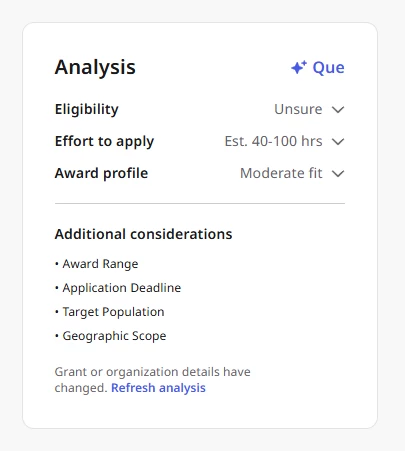
Step 1: Review your eligibility result
The eligibility section tells you whether your organization meets the funder’s basic stated requirements. Start here—if your organization is not eligible, the rest of the evaluation is moot.
Your eligibility result will show one of three labels:
- Eligible - The evaluation found that your organization meets all stated requirements. You can move forward with confidence that you qualify.
- Not Eligible - The evaluation identified an explicit disqualifying factor. Pass on this grant unless you have reason to believe the evaluation misread the requirements or your organization profile is out of date.
- Unsure - The evaluation could not determine eligibility with confidence. Read the rationale to find out which factor could not be assessed.
If your result is Unsure, take one of the following steps before moving forward:
- If the missing information is in your organization profile—a service area that is not recorded, for example—update your profile and re-run the evaluation.
- If the gap is in the grant description itself, consider contacting the funder directly for clarification, or make your best judgment based on the available information.
Regardless of your result, read the rationale. It explains which criteria were checked, what was found, and anything that was skipped due to missing information. As a final check, open the full grant guidelines and search for terms like “must be,” “eligible applicants,” or “ineligible” to confirm the evaluation did not miss or misread a requirement.
Step 2: Assess the Effort to apply
The effort section estimates how much staff time the application will require, from planning through submission. Use this section to decide whether your team has the capacity to pursue the grant competitively before you commit.
Work through the effort section in three passes:
Start with the hours range.
Consider where your team would realistically land within that range. If you have strong templates and have applied to this funder before, you are likely to come in at the lower end. If this is a new funder, a new program area, or you anticipate multiple internal review cycles, plan toward the upper end—or beyond it.
Review the deliverables list.
Each item in the deliverables list represents something your team will need to produce. Some will be quick pulls from existing materials; others will require new work. Pay particular attention to deliverables that involve external coordination—letters of support, partnership agreements, or third-party data—because those tasks often take longer than the writing itself.
Note any special requirements.
Identify any requirements called out separately in the evaluation: federal compliance obligations such as human subjects protocols or data management plans, portal-specific submission processes, or multi-stage application timelines. If any of these apply, we recommend that you assign ownership early, as an IRB review cycle or a SAM.gov registration deadline may be approaching.
Step 3: Interpret the Award profile
The award profile tells you how well your organization aligns with what the funder actually funds. This is more of a fit signal vs. a win prediction and should be read alongside eligibility, along with effort, when making your decision.
Your award profile result will show one of four labels:
- Strong Fit - A positive signal. Pursue the grant if eligibility and effort are acceptable.
- Moderate Fit - Meaningful alignment, but not a perfect match. This is still a viable reason to apply. Plan to spend time in your proposal narrative explicitly showing how your work advances the funder’s stated priorities.
- Weak Fit - Limited alignment. Consider deprioritizing this grant unless the award amount is unusually large or building a relationship with this funder is strategically important. Your proposal will need to work harder to demonstrate fit, and the return on investment may be low.
- Unclear - The evaluation could not assess fit with confidence, typically because funder giving history is not yet available. Do not treat Unclear as a negative finding—it reflects limited data, not a signal that you are a poor match.
Read the rationale for any result. It explains which factors were evaluated and how the assessment was reached. When data is limited, the rationale will say so explicitly—for example: “We don’t have enough funder data to assess giving history. However, your program focus aligns with the grant’s stated priorities.”
For any grant where the award profile is Unclear or Weak, supplement the evaluation with your own research. Search for the funder’s recent awards on their website or in grant databases, and consider: Are there organizations like mine in their recent grantee list? What geographies, program types, and organizational sizes do they fund? This independent research often surfaces alignment—or lack of it—that the system cannot assess on its own.
Step 4: Review considerations
Considerations are factual observations that do not fit neatly into eligibility, effort, or award profile, but can materially affect your decision or your ability to complete the project if you are awarded. Review each consideration and flag anything that would affect your organization’s finances, staff capacity, or application timeline.
Items commonly called out in considerations include:
- Cost sharing or matching requirements that would obligate your organization to contribute funds or in-kind resources
- Post-award reporting obligations that would require dedicated staff time beyond the grant period
- Payment structures—such as reimbursement-based disbursements—that affect cash flow planning
- Pre-registration deadlines for systems like SAM.gov that must be completed before you can apply
These are the details that often catch teams off guard after they have already committed to applying. Reviewing considerations early helps to avoid that.
Step 5: Understand Unsure and Unclear results
Both labels mean the same thing > The system did not have enough information to make a confident determination. Neither is a negative finding. Understanding what caused the label helps you decide what to do next.
Unsure/Unclear result scenario | Result description |
| Unsure on Eligibility | A gap in your organization profile or in the grant description prevented the eligibility check from running fully. If the missing information is within your control—a service area, budget figure, or population served that is not yet in your profile—update your profile and re-run the evaluation. If the grant description itself is simply vague, contact the funder or make your best judgment from the available information. |
| Unclear on Award Profile | Funder giving history is not yet available for this grant. This is especially common for grants in the current phase of Nonprofit Hub’s evaluation capabilities. Eligibility and effort still run at full strength—use those results together with your own research to make your decision. As funder data becomes available over time, Unclear labels will resolve to labeled fit assessments for more funders. |
What else do you need help with?
- How do I explore grant opportunities with Bonterra’s GrantMatch?
- How does Grant Analysis work?
- How do I make a Go/No-Go Grant decision?
- What is grant proposal drafting in the Nonprofit Hub?
- How do I generate and refine a Grant proposal?
Not what you’re looking for? Navigate to Understanding Grant Discovery and Readiness in the Nonprofit Hub