


Understanding Bonterra Que in Apricot
Overview
Bonterra Que is an AI platform built directly into Apricot to help your team spend less time on administrative work and more time creating impact with the people you serve.
Que works through a growing library of skills — each one designed to assist with a specific part of the case management workflow and embedded in the places you already work in Apricot.
Que skills in Apricot
Que is always improving, and more skills will be arriving in Apricot soon. This section will be updated as new Que skills become available.
Currently available:
Participant Snapshot — Generates a quick AI summary of a participant’s recent activity so staff can get up to speed before any interaction, handoff, or coverage situation.
-
Available in beta as of May 22, 2026 for U.S.-based Apricot users.
Coming soon:
Note Capture — Converts spoken or written field notes into structured text mapped directly into the right fields in your form, so documentation happens in the moment. Will be available in Apricot Mobile, a dedicated mobile app for iPhone and Android.
- What is Apricot Mobile and Note Capture? (Bonterra Que)
- How do I use Note Capture in Apricot Mobile? (Bonterra Que)
- How do I enable forms for Apricot Mobile? (Bonterra Que)
Early Intervention Signals — Monitors patterns across program-defined risk and protective indicators and surfaces nudges to frontline staff when a participant may need follow-up, so case managers know who needs attention without manually reviewing every record.
-
Contact em.rattini-reich@bonterratech.com to express interest in joining the beta
Is Bonterra Que safe and secure?
Bonterra is committed to responsible AI. Here’s what that means for your organization:
-
Your data is never used to train LLMs. Data is used only in the moment a skill is activated and is not retained or reused.
-
PII fields are removed before data moves through the model. Personally identifiable information is stripped before being processed.
-
Que respects your existing Apricot permissions. Users only see outputs generated from data they already have access to.
-
Que always requires human approval before acting. No action is taken on your behalf without your explicit input.
-
Que is managed at the organizational level. Admins can disable Que skills at any time through A La Carte Features.
You can read more about our approach to AI in our AI Responsibility Statement and our Ethical AI Values.
Is Bonterra Que free?
During the beta, full access to available Que skills is free for all users in organizations that have the skill enabled.
Once the beta period ends on October 15, 2026, a free tier will remain available with a monthly usage limit for each skill. You can upgrade to a paid tier for unlimited use.
For admins: managing Que in your organization
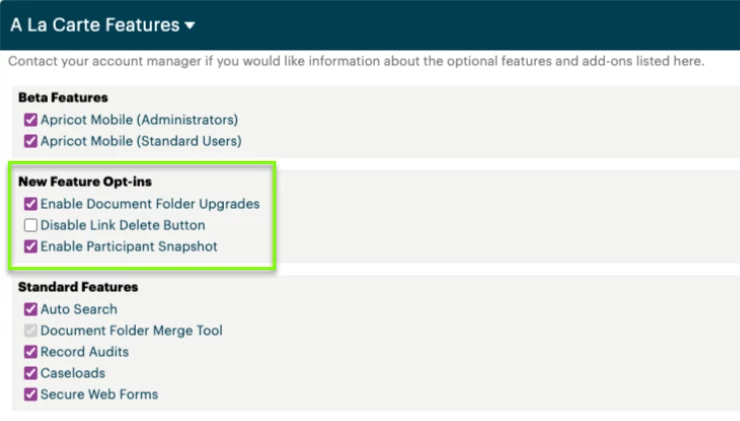
Que skills are managed through the A La Carte Features page. You can disable individual skills for your organization at any time.
To manage Que skills:
-
Navigate to Administrator > A La Carte Features.
-
Locate the skill you want to manage under New Feature Opt-ins.
-
Uncheck the setting as desired. You can re-enable the skill at any time by re-checking the box.
Changes apply organization-wide and take effect immediately. You can adjust this setting at any time.
Legal
Use of Bonterra Que in Apricot is subject to our AI MSA Addendum.