


What is Participant Snapshot? (Bonterra Que)
Overview
Participant Snapshot is a skill in Bonterra Que. For an overview of Que, how it works, and available skills, see Understanding Bonterra Que.
Participant Snapshot generates an AI-powered summary of a participant's recent activity directly inside Apricot. It pulls from the places in Apricot that staff would normally have to manually search and read through — surfacing a focused brief for case managers right where they already work.
Think of it as a quick “here’s what you need to know” before opening the full case file.
Participant Snapshot is located in the Document Folder, just below Quick View Information. It is currently in beta, available to all U.S.-based Apricot users starting May 22, 2026.
What does a snapshot include?
Each snapshot summarizes your participant's most recent activity, including recent Tier 2 entries, Core Element updates, and key status changes.
The summary is generated on demand. It reflects only what's already in the participant's record — it doesn't add to the record, change any data, or create new documentation.
Admins can exclude specific Tier 2 forms from snapshots. See For Admins: managing Participant Snapshot for details.
When is it helpful?
Participant Snapshot is designed for the moments when you need context fast:
-
Handoffs and coverage — Picking up a case for a colleague or returning to a participant you haven't worked with recently
-
Pre-interaction prep — Reviewing what's changed before a scheduled interaction
-
Large caseloads — Getting oriented quickly between back-to-back interactions without re-reading full case notes
-
Supervision — Reviewing a case at a glance without pulling the full file
How to generate a Participant Snapshot
-
Open a participant record in Apricot.
-
Navigate to the Document Folder tab.
-
Locate the Participant Snapshot section just below Quick View Information.
-
Click Generate with Que to create a summary based on recent activity.

-
The summary appears on screen. Review it as needed for context — it is not saved to the record.
How snapshots are saved
When you generate a Participant Snapshot, it stays visible in the Document Folder for your next visit — so you don't have to regenerate it every time you open the record.
Here's how it works:
-
Your snapshot is saved until something changes. If new records are added or existing records are updated, your snapshot clears automatically and the Generate with Que button reappears. This prompts you to create a fresh snapshot that reflects the latest activity.
-
Only you see your snapshot. Snapshots are personal — only the person who generated it can see it. Other users viewing the same participant record won't see your snapshot, and you won't see theirs.
-
There's no timestamp on a saved snapshot. If you're unsure whether your snapshot reflects the most recent activity, check the participant's records directly or generate a new one.
Understanding your snapshot
Participant Snapshot summarizes existing information in the participant's record. Here are a few things to keep in mind:
-
It's a starting point, not a full review. The snapshot gives you orientation support — it's not a substitute for reading Tier 2 records or Core Elements when a full review is needed.
-
It's labeled as AI-generated. Summaries are clearly marked so you always know what you're looking at.
-
Saved snapshots reflect activity at the time they were generated. If records have been updated since your last visit, the snapshot will clear and prompt you to generate a new one.
-
You're in control. The snapshot doesn't take any action, make recommendations, or change how you document interactions. It summarizes — you decide what to do with it.
Data privacy and security
We know data privacy is a top priority in case management. Here's how Participant Snapshot handles participant data:
-
Participant data is never used to train LLMs. Data is used only in the moment the summary is generated.
-
PII fields are removed before data moves through the model. Personally identifiable information is stripped before being processed to generate the snapshot.
-
Summaries respect your existing Apricot permissions. Users only see summaries generated from data they already have access to. Participant Snapshot does not surface information outside of a user's existing access level.
-
Summaries are not saved to the record. The snapshot is not written back to the participant file, stored as a Tier 2, or retained after you close it.
-
The AI does not take action. Participant Snapshot is a read-only summarization tool. It does not make decisions, create recommendations, score participants, or flag risk.
What Participant Snapshot does not do
-
It does not summarize the full case history — only the most recent 2–4 records
-
It does not make recommendations or flag risk
-
It does not replace or update any records
-
It does not change how case notes are created or managed
-
It is not legally authoritative documentation
For admins: managing Participant Snapshot
Participant Snapshot is turned on and available to all users in your organization by default. You can disable it at any time through the A La Carte Features menu.
To turn Participant Snapshot off:
-
Navigate to Administrator > A La Carte Features.
-
Locate Enable Participant Snapshot under New Feature Opt-ins.
-
Uncheck the setting as desired. You can re-enable the skill at any time by re-checking the box.
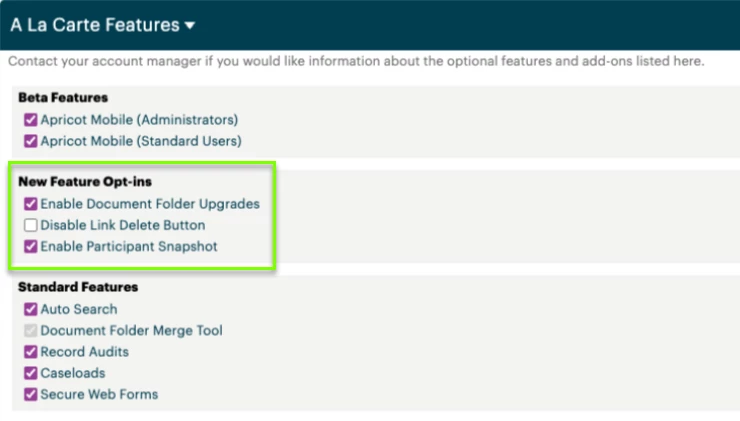
Changes apply organization-wide and take effect immediately. You can adjust this setting at any time.
Excluding specific Tier 2 forms from snapshots
If a form contains information you don’t want included in the Que-generated summaries, you can exclude it at the form level. To exclude a Tier 2 form:
- Open the Tier 2 form in Form Builder.
- Go to the form’s Properties.
- Check Exclude from AI summarization.
- Save your changes.
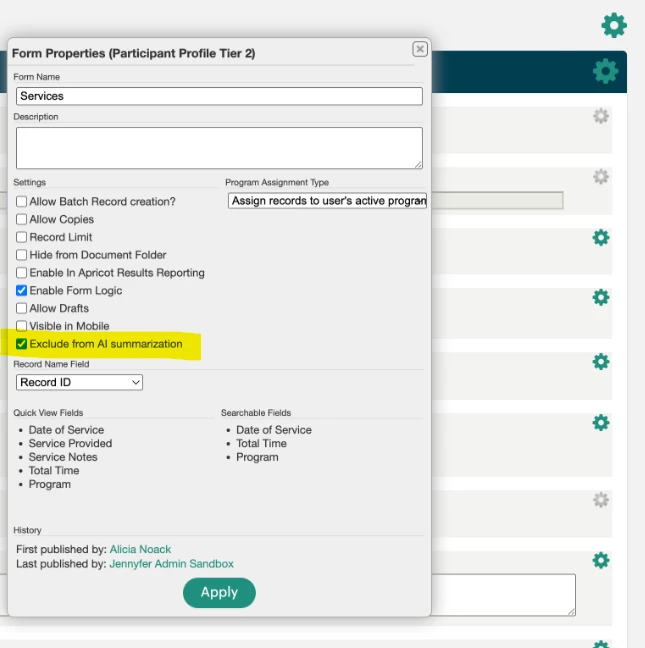
Once checked, that form will not be included when Que generates a Participant Snapshot. Changes apply immediately after saving. You can uncheck the setting at any time to re-include the form.
Frequently asked questions
Is Participant Snapshot available to all Apricot users? Participant Snapshot is available to all U.S.-based Apricot users during the open beta at no additional cost. Admins can disable or re-enable it for their organization at any time through A La Carte features.
Do I have to use it? No. Generating a snapshot is always your choice — clicking Generate with Que is the only way a snapshot is created. Nothing happens automatically.
What if the summary doesn't look right? Summaries reflect what's in the participant's record. If something looks off, check the source records directly. The snapshot is orientation support — always verify important details in the full case file.
Can I control which forms are included in a snapshot? Yes. Admins can exclude specific Tier 2 forms from Participant Snapshots by checking “Exclude from AI summarization” in the form’s properties in Form Builder. This applies organization-wide and takes effect immediately.
Is Participant Snapshot free? Yes, during the open beta, full access is free for all U.S.-based users in organizations that have Que enabled. When Participant Snapshot moves to general availability, full access will require a paid add-on. Users in organizations that have the skill enabled but did not purchase the add-on will be placed in a free tier with limited access.